Forum
Welcome, Guest
Please Login to access forum.
Padding/Margins for Modules (1 viewing) 
Go to bottom
TOPIC: Padding/Margins for Modules
#2446
Hope Kiah
Fresh Boarder
Posts: 4
User Offline
Padding/Margins for Modules Karma: 0  
Greetings,
Please visit http://www.allanhouser.com on a mobile phone and scroll down. There are two modules with spacing issues. See ALLAN HOUSER GALLERY and COLLECTING ALLAN HOUSER. You can see the screenshot attached with a big space between the two modules. I tried adding various CSS to the Responsivizer Main.css file, like this:
Code:

.moduleblock1 { margin:0; padding:0; }
But it made no difference. I need to close the gap between these two modules. thanks, Hope
 
Logged Logged  
  The administrator has disabled public write access.
#2447
John Dagelmore
Admin
Posts: 3885
User Online Now
Re:Padding/Margins for Modules Karma: 84  
Greetings Hope,

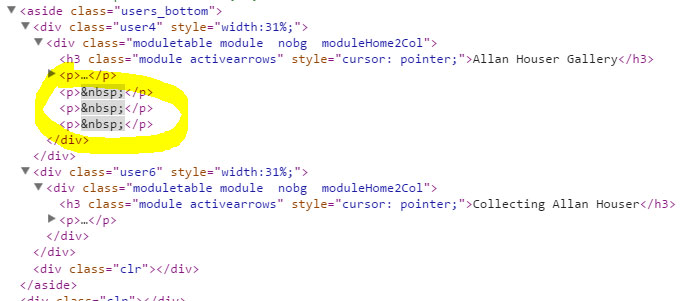
i looked at your site but the problem is not about CSS, you have some extra empty <p> at the bottom of the first module that get space. You have to remove that empty paragraphs probably added inside the HTML of the module.

John
 
Logged Logged  
  The administrator has disabled public write access.
#2448
Hope Kiah
Fresh Boarder
Posts: 4
User Offline
Re:Padding/Margins for Modules Karma: 0  
Oh gosh. I meant to check that detail. I remember now that the border of the module was not wrapping properly without the extra <p> tags. Sorry for the trouble. I fixed it by adding more text. THanks so much for digging into the obvious, where I should have looked!
 
Logged Logged  
  The administrator has disabled public write access.
Go to top