Forum
Welcome, Guest
Please Login to access forum.
Re:Mouse Over in Control Panel Colors (1 viewing) 
Go to bottom
TOPIC: Re:Mouse Over in Control Panel Colors
#2771
Allan Denholm
Fresh Boarder
Posts: 2
User Offline
Mouse Over in Control Panel Colors Karma: 0  
Hi
I have only just installed Responsiviser and have hit an immediate problem!
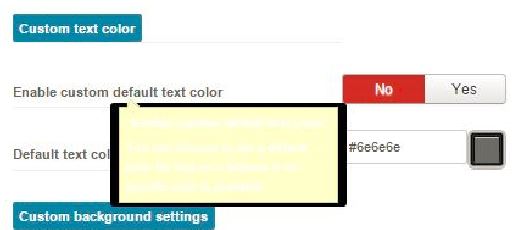
When I mouse over an option in the HMI, the explanatory pop up box for what that function does appears, but with white text on a yellow background!
Appreciate your advice on where to change this for a more legible color combo....
Thanks!
 
Logged Logged  
  The administrator has disabled public write access.
#2772
John Dagelmore
Admin
Posts: 3885
User Online Now
Re:Mouse Over in Control Panel Colors Karma: 84  
Hi Allan,

not sure what you mean with HMI.... i guess you are talking about popup box in the admnistrator interface.
If so, this is not normal because popup must be black with white text. Of course i know nothing about your setup, Joomla version, etc and your would be the first case.

John
 
Logged Logged  
  The administrator has disabled public write access.
#2773
Allan Denholm
Fresh Boarder
Posts: 2
User Offline
Re:Mouse Over in Control Panel Colors Karma: 0  
Hi John
Thanks for getting back to me so quickly!
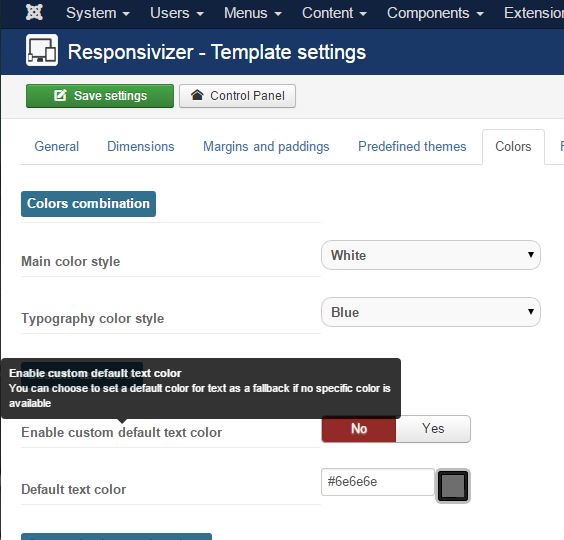
So in your screenshot - where you have the "Enable custom default text color...." pop up box, you have white text on a black background, I have white text on yellow... See attached.
I am running Joomla 2.5.14 on Windows 7 Professional - let me know what else you might need to advise?
Thanks again
Allan
 
Logged Logged  
  The administrator has disabled public write access.
#2774
John Dagelmore
Admin
Posts: 3885
User Online Now
Re:Mouse Over in Control Panel Colors Karma: 84  
 
Logged Logged  
  The administrator has disabled public write access.
Go to top