Forum
Welcome, Guest
Please Login to access forum.
no image:loc on gnews sitemap (1 viewing) 
Go to bottom
TOPIC: no image:loc on gnews sitemap
#5345
biguphosting
Fresh Boarder
Posts: 8
User Offline
no image:loc on gnews sitemap Karma: 0  
hello!
I can't see where to configure the sitemap so the images are listed on the gnews sitemap file http://metrolibre.com/sitemap/gnews

I see no image:loc

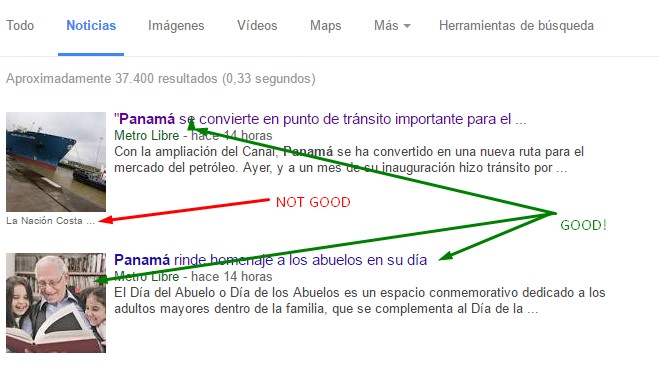
I'm trying to fix an issue that I search news for my site, they list on the google news BUT the image has another link to another media. Title links correctly, image won't.

I'm attaching an image of the listing. Green arrows point to everything that is good, red arrow to the image that, if clicked, points to another media.
 
Logged Logged  
  The administrator has disabled public write access.
#5348
John Dagelmore
Admin
Posts: 3873
User Online Now
Re:no image:loc on gnews sitemap Karma: 84  
Hello,

you can't manage images for news using the gnews sitemap. The Google News XML format doesn't support images informations at all. What image to pick for the news is up to Google based on the HTML of your website, the only way that you could help Google to identify a particular image is using meta tags for medias.

Said that, i've no idea how and why Google is showing a link to the image not good in the search result, but most probably it's related only on informations found in the HTML by the Google Bot, nothing to do with sitemaps.
 
Logged Logged  
  The administrator has disabled public write access.
#5350
biguphosting
Fresh Boarder
Posts: 8
User Offline
Re:no image:loc on gnews sitemap Karma: 0  
I searched the google news forums and it's related to the og:image at the article's meta or image:loc at the sitemap file.

I see none of it. Is there any place to config this?
 
Logged Logged  
  The administrator has disabled public write access.
#5351
John Dagelmore
Admin
Posts: 3873
User Online Now
Re:no image:loc on gnews sitemap Karma: 84  
As i said you previously, it's most probably related to the og:image meta tags found in the article page.
You should try to use a plugin like this one to configure it: http://extensions.joomla.org/extension/simple-facebook-meta
 
Logged Logged  
  The administrator has disabled public write access.
#5352
biguphosting
Fresh Boarder
Posts: 8
User Offline
Re:no image:loc on gnews sitemap Karma: 0  
I just ran "grep -Ril og:image" and I found

    administrator/components/com_jmap/sql/install.mysql.utf8.sql
    administrator/components/com_jmap/models/ajaxserver.php
    administrator/components/com_jmap/installscript.php
    administrator/components/com_jmap/framework/file/metainfo.php
    administrator/components/com_jmap/views/metainfo/tmpl/default_list.php
    administrator/components/com_jmap/js/metainfo.js
    plugins/system/jmap/jmap.php


And there's a table jmap_metainfo on my database but it's empty.

one of these files tries to pull the info from that table but, as it is empty, throws nothing in return.

How do I make this work?


I'm looking at file administrator/components/com_jmap/framework/file/metainfo.php line 106
Code:

105 // Check if the link as primary key already exists in this table 106 $selectQuery = "SELECT" . $this->dbo->quoteName('id') . 107 "\n FROM " . $this->dbo->quoteName('#__jmap_metainfo') . 108 "\n WHERE" . 109 $this->dbo->quoteName('linkurl') . " = " . $this->dbo->quote($dbRecord[COM_JMAP_METAINFO_LINK]); 110 $linkExists = $this->dbo->setQuery ( $selectQuery )->loadResult(); 111 112 // If the link exists just update it, otherwise insert a new one 113 if($linkExists) { ........
This code isn't running. Table isn't filling, as the query on line 106 isn't being executed. What do I need to do to make this work?
 
Logged Logged  
  The administrator has disabled public write access.
#5353
biguphosting
Fresh Boarder
Posts: 8
User Offline
Re:no image:loc on gnews sitemap Karma: 0  
I found the image:loc tag on your same code!!!
file: components/com_jmap/views/sitemap/tmpl/default_images_content.php

line: 164
Code:

<image:loc><?php echo htmlspecialchars(preg_match('/^http|^\/\//i', $imageLink) ? ($cdnProtocol && strpos($imageLink, 'http') === false ? $cdnProtocol . $imageLink : $imageLink) : $this->liveSite . '/' . ltrim($imageLink, '/'), null, 'UTF-8', false);?></image:loc>
I need to make this work properly. Tell me what I need to config to make this work as it should.
 
Logged Logged  
  The administrator has disabled public write access.
Go to top